
Drip Campaigns

Drip Campaigns That React to What People Do

Amernet drip campaigns run a sequence that changes course based on behaviour — who opened, who clicked, who accepted the connection, who went quiet — across email, LinkedIn and AI phone calls.

Build it visually: send an email, wait, branch on what happened, call the ones who are warm, hand the good ones to a person. Sixteen ready-made templates if you would rather start from something that works.

And it is guarded: do-not-call lists, per-contact caps, cooldowns and business hours are enforced by the system, not by whoever built the workflow.
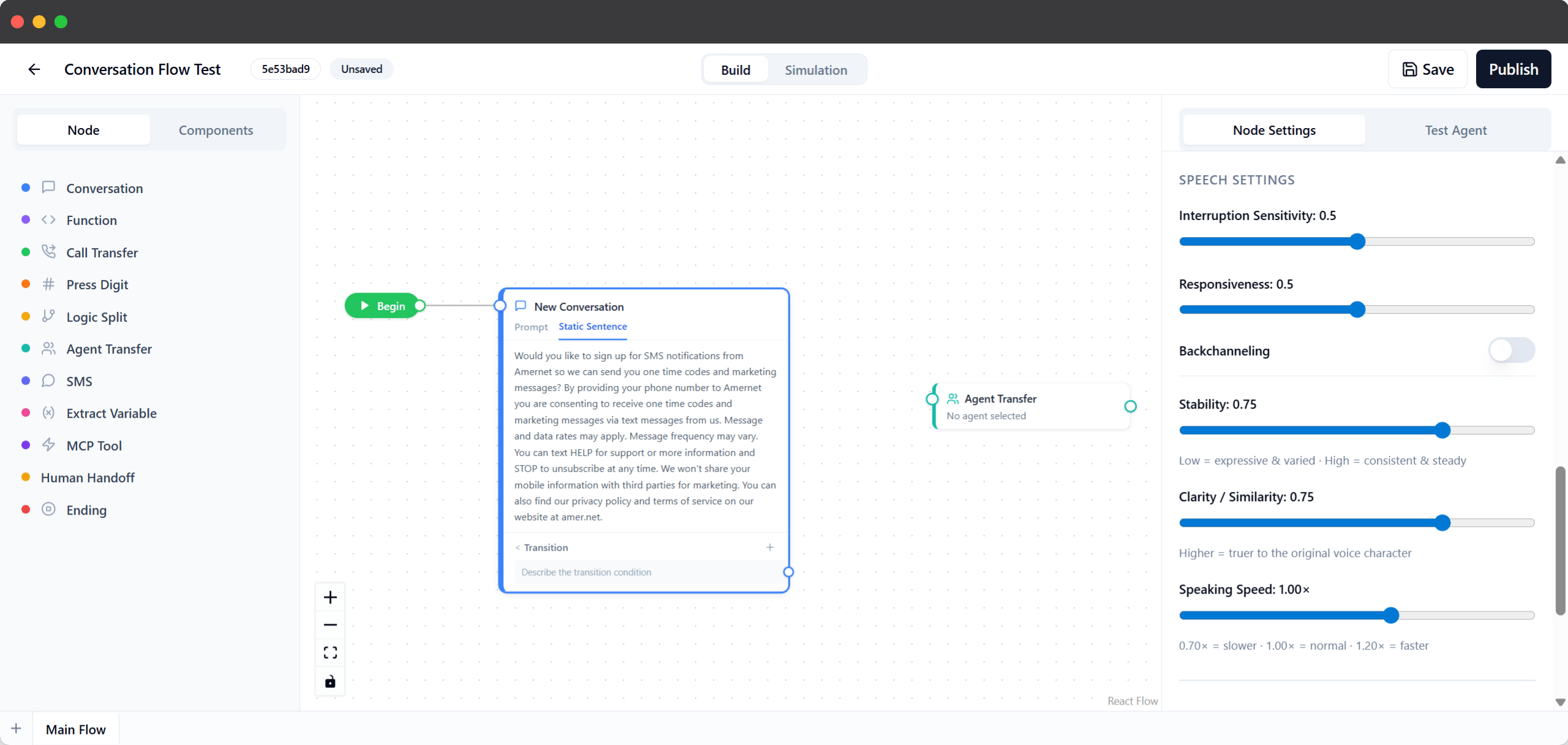
Amernet conversation flow builder: a Begin node linked to a conversation node and an agent transfer, with the node palette and speech settings panel
The workflow

What a drip campaign actually does

A sequence that branches on behaviour instead of running blind.

A workflow is a flow chart you build by dragging: send an email campaign, wait two days, then split — the people who clicked go one way, the silent ones go another. Each branch can send, wait, call, message on LinkedIn, update the record, or hand over to a person.

Because it branches on real behaviour, the people who are paying attention get a different sequence from the people who are not.

Waits are either a duration or a specific moment, so a follow-up can land two days later or on the morning of a renewal date.

Workflows can also hand off to each other, so a long programme is built from a few readable sequences rather than one enormous chart nobody wants to open.

What it can do

Six things a workflow can do at a step

Every one of these is a node you can drop into a sequence.

Send email, or write it per person

Send a campaign email, or have the AI write one personalised to that specific contact rather than sending everyone the same paragraph.

Branch on what they did

Split on opens and clicks, on a LinkedIn connection being accepted, on a field in the record, or as an A/B test.

Put an AI agent on the phone

When someone goes warm, the workflow can have an AI agent call them, with everything you know about them already in hand.

Reach them on LinkedIn

Connection requests and messages run as part of the same sequence, under a daily cap so the account is not put at risk.

Warm transfer to a person

The best conversations can be handed to a human, with the agent screening and introducing the call first.

Update your other systems

Sync to the CRM, set a lead stage, apply tags, update a field, or fire a webhook, so the rest of your stack keeps up.

The guardrails

What stops it embarrassing you

The limits are enforced by the system, not by the person who built the flow.

Automated outreach goes wrong in predictable ways: the same person called twice in an hour, a message at two in the morning, somebody on the do-not-call list contacted anyway, or one stuck sequence mailing a single address over and over.

So calls are checked against a do-not-call list, a per-contact daily cap and a cooldown window before they are placed, and work waits for the next business-hours window rather than running overnight.

Email has its own per-recipient limits, and the suppression list is kept against the address rather than the contact record — so someone who opted out stays opted out even if the contact is deleted and re-imported later.

Open tracking is equally careful: mail providers pre-fetch tracking pixels whether or not anyone read the message, and those are recognised rather than counted as genuine interest.

Questions

Common questions about drip campaigns

What people ask before automating their follow-up.

No. There are sixteen ready-made templates covering onboarding, nurture, re-engagement and multi-channel sequences. Start from one and change what you need.

Email opens and clicks, whether a LinkedIn connection was accepted, a condition on the contact record, or a straight A/B split.

Yes. A step can put an AI agent on a call to that contact, with what you already know about them available during the conversation. See AI agents.

Calls are checked against a do-not-call list, a per-contact daily cap and a cooldown period first, and work waits for the next business-hours window instead of running overnight.

Yes. Suppression is held against the email address itself rather than the contact row, so it survives the contact being deleted or re-imported.

Providers pre-fetch tracking pixels whether or not a person opened the message. Those fetches are identified rather than treated as engagement, so a branch on ‘opened’ is not triggered by a machine.

Put your follow-up on rails

Start from a template, or map the sequence you already run by hand.

Most teams already have a follow-up sequence — it just lives in somebody’s head and gets skipped when the week gets busy. Book a short session and we will build that sequence as a workflow and watch it run.